


Spades: Classic Card Game
4.98.63K Reviews
App Specs
- Version
- 2.7.0
- Updated On
- License
- Free
- Downloads
- 5,000,000+
- Developer
- NewPubCo
- Categories
- Card
- Platform
- Android, iOS
Screenshots
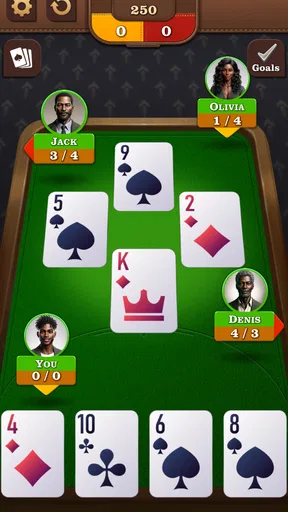
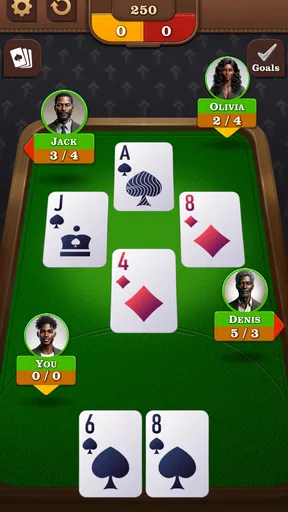
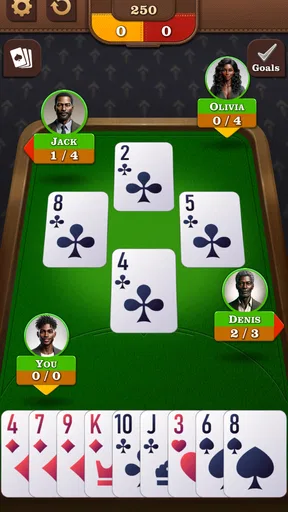

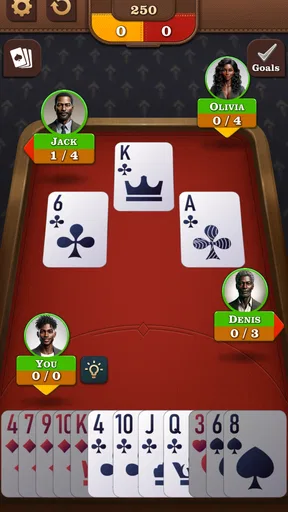
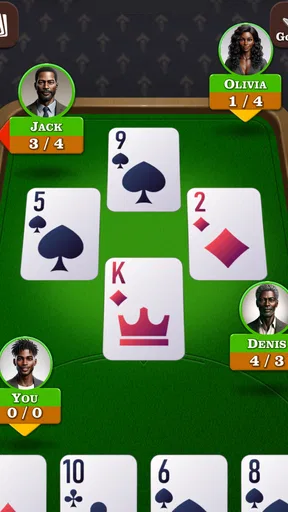
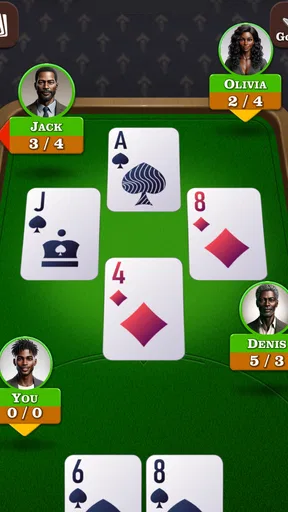
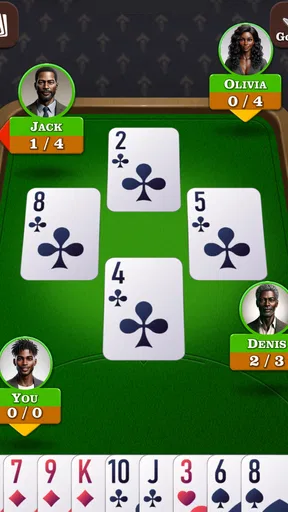
 Analysis by AppCompare
Spades makes its appeal quickly: the rules are familiar enough to pick up, but each hand asks me to judge what I can win and how my choices affect the partnership. That gives a short session a satisfying bit of strategy without requiring a long commitment. Spades: Classic Card Game is a free card game from NewPubCo, and its central draw is the chance to practise the classic trick-taking game on a phone, including when I’m away from a connection.
Why the first sessions work
In my experience, Spades is easy to return to because a hand has a clear rhythm: assess the cards, make a bid, then decide which tricks to pursue. The appeal is not flashy progression; it is the small challenge of reading the hand accurately and adjusting when play does not follow the plan. For a newcomer, that makes the game approachable while leaving room to improve.
The offline option is especially useful in ordinary dead time: I can play during a commute with unreliable service, while waiting for an appointment, or somewhere I would rather not depend on Wi-Fi. It also makes the game a practical choice for a quick solo session when friends are not available. The trade-off is that offline play cannot replace the unpredictability or conversation of a real table.
What keeps it in the routine
Spades tends to earn repeat visits through variation within familiar rules. A different hand changes the decisions, and a bid that seemed sensible can become awkward once the cards are played. I find that more durable than a game built around a novelty mechanic: the challenge comes from making better judgements, not simply unlocking another distraction.
That recurring value depends on what I want from a mobile card game. If I enjoy practising decisions at my own pace, a solo session can fit neatly into a daily routine. If I mainly want lively human competition, social play matters more, and I would choose an option that reliably brings me together with the people I want to play. The app’s listed 4.9 average from around 59,000 ratings and over 5 million installs suggest a broad audience, but popularity does not decide whether its style suits me.
What to consider before installing
The game is free to download, with optional in-app purchases ranging from $0.99 to $9.99 per item. I would start without spending and see whether the core card play is enough for me; the purchase range is worth knowing if I prefer games with no paid extras at all. It is rated Everyone, and its current version is 2.6.3, with Android 7.1 or later required.
There is also a useful distinction between classic Spades and a general collection of card games. This is a focused choice if I want to practise one specific game, rather than switch between solitaire, poker, or several unrelated formats in the same app. That focus can feel refreshing, but it also means the experience may become repetitive for someone who wants constant changes of rules or a wider catalogue.
Worth Reading Before You Choose

EA SPORTS FC Mobile 26 Is a Bigger Football Game, but It Takes Time

Flipboard Shows What News Apps Must Do Beyond the Feed

Switching to Android Auto Means Rethinking Your Driving Routine

Google Calendar Makes a Crowded Week Easier to Manage

Ludo King Makes the Most of the Minutes Between Plans

Baby Panda World Brings Quick Play to Modern Phones, but Its Game Library Feels Busy
Getting Started with Spades
First things first, downloading Spades: Classic Card Game is a breeze. It's available for both Android and iOS, so no one's left out of the fun. Once installed, the app welcomes you with a clean and intuitive interface, making it easy to navigate even if you're a newbie. The vibrant graphics and smooth animations add a modern touch to the classic game, keeping you engaged from the get-go.
Gameplay and Features
Now, let’s talk about the gameplay. For those who are new, Spades is a trick-taking card game, similar to Hearts or Bridge, but with its own unique twists. The goal? To accurately predict the number of tricks your team can win. Sounds simple enough, right? But don't be fooled; it's all about strategy, anticipation, and a little bit of luck.
The app offers several game modes to keep things interesting. You can play solo, team up with a friend, or compete against players from around the world. The multiplayer feature is a standout, offering seamless connectivity so you can challenge friends or random opponents. If you're playing solo, the AI partners and opponents are surprisingly clever, offering a challenging experience that keeps you on your toes.
One of the highlights is the customizable options. You can tweak the rules, choose different difficulty levels, and even personalize your card deck. For someone like me who loves a personalized gaming experience, these options are a big win.
Why Spades Stands Out
So, what makes Spades: Classic Card Game a must-download? For starters, it's the perfect balance between nostalgia and modern gaming. The app stays true to the classic rules while integrating features that make it accessible and engaging for mobile users. Plus, there's something incredibly satisfying about outsmarting your opponent with a perfect trick!
The game also offers a unique social element. You can chat with friends during matches, send emojis, and even join tournaments to test your skills against a broader audience. These features make it more than just a card game; it's a community.
Design and User Experience
Let’s talk design. The app's interface is sleek and user-friendly. The cards are easy to read, and the layout is intuitive, which means less fumbling around and more time playing. The developers have nailed the aesthetics, with vibrant colors and smooth animations that enhance the overall experience. The background music and sound effects are subtle yet effective, adding to the immersive atmosphere.
One thing I truly appreciate is the attention to detail. The tutorials are comprehensive, guiding new players through the basics without overwhelming them. This makes it an excellent choice for beginners and experienced players alike.
Settling into a routine
After the novelty of a new game wears off, the question is whether I still have a reason to open it. Here, the strongest answer is the changing hand. Spades does not need a new theme every few days when the underlying decisions remain interesting: how ambitious to be with a bid, when to spend a strong card, and when to protect the partnership’s likely result. I can treat a round as a small puzzle rather than a task to clear.
A realistic use for me is a brief break between errands. I can play a solo hand without arranging a group or waiting for someone to be online, then put the phone away when the break ends. That convenience is the game’s most dependable habit-forming quality, but it is also a boundary: if I want a match to feel like a shared occasion, an in-person deck or a more explicitly social game night is better.
Small decisions that improve play
For a new player, I would resist bidding too confidently just because a hand looks strong. Spades rewards estimating the whole hand, not counting only the cards that seem likely to win. A useful practice is to remember which high cards have already appeared and compare that with the tricks still available. Even without keeping formal notes, this makes later decisions feel less like guesses.
When playing with a partner, I also try to think about the team’s target rather than treating every trick as a personal contest. A bid that is slightly cautious can be more sensible than chasing an impressive total, especially when the other side’s play changes the shape of the hand. The game is most satisfying when I review why a plan succeeded or failed instead of immediately blaming a bad draw.
The adjustable difficulty and rules mentioned in the original experience can help make practice more deliberate. I would settle on a consistent rules setup while learning, then change one setting at a time. That way, a better or worse result has a clearer explanation. Customizing everything at once may be fun, but it makes it harder to tell whether I am improving at Spades or simply adapting to a different version.
Choosing it over other card games
Compared with solitaire, Spades asks me to consider a team outcome and anticipate other players, so it feels more interactive even when I am playing against the app. Compared with Hearts, it puts the focus on predicting tricks rather than avoiding particular cards or outcomes. Bridge offers another deep partnership challenge, but it can demand more learning before a casual player feels comfortable. Spades sits in a useful middle ground: strategic enough to reward attention, yet familiar enough to start without turning a short break into a study session.
That comparison also clarifies who may not enjoy it. If I want a card app that constantly rotates through different games, this focused format is a poor match. If I dislike bidding or prefer games where each move is independent of a partner’s target, the central tension of Spades may feel like pressure rather than fun. A broad card collection or a solo puzzle game would suit those preferences better.
Connection, company, and expectations
The offline appeal answers an important practical question: I can use it when a connection is unavailable, which makes it more dependable than a game whose whole point requires live opponents. For company, however, the social options described in the app are the better fit. Playing with a friend, chatting, or joining a tournament gives the familiar rules a more communal feel, while solo play is strongest as practice and an easy way to fill spare minutes.
I would choose the mode to match the moment rather than expect one style to do everything. On a quiet evening, solo play gives me room to think through a hand. When I want banter and the unpredictability of people, multiplayer is the more appealing choice. If a connection is patchy, offline play is the safer plan, but it cannot provide the same social exchange. This separation is helpful: the game has a role for different situations, though no single mode replaces a real table in every way.
Where the routine can wear thin
The main fatigue risk is repetition, not a complicated setup. The same basic structure is the reason Spades stays approachable, but it can also lose its pull if I am not interested in refining my judgement. Custom rules and difficulty choices offer ways to adjust the experience, yet they do not turn a focused card game into a varied collection. I would not install it expecting a steady stream of unrelated activities.
There is a second trade-off in playing against computer-controlled partners and opponents. They let me practise at my own pace, and that is valuable when no one else is around, but they cannot reproduce every human habit or the feel of a table where plans and reactions emerge socially. When I want to test my ability against people, I should choose multiplayer; when I mainly want convenient repetition, solo play does the job. Keeping those expectations distinct makes the app easier to appreciate.
The overall maintenance burden is low in the everyday sense: the core activity is clear, and I do not need to coordinate a group to begin a solo session. The practical checks are modest—make sure the device meets the stated Android requirement if I use Android, and remember that the game’s free entry includes optional purchases. The age rating is Everyone, which makes it broadly suitable as a family-friendly card-game option, though adults and children may still want to agree on sensible device and spending habits.
Who gets lasting value
I would recommend this to someone who already likes trick-taking games, wants a convenient way to practise Spades, or needs an offline-friendly pastime for short gaps in the day. It also makes sense for a beginner who is willing to learn through repeated hands instead of expecting every decision to be obvious immediately. NewPubCo’s card game has a 4.9 average across roughly 59,000 ratings and around 8,500 reviews, but my practical reason to keep it would be simpler: each hand gives me another chance to judge a bid more carefully.
I would skip it if my priority is a large library, a highly social experience every time I play, or a game that changes its basic activity from session to session. I would also think twice if optional purchases are a deal-breaker, even though the game is free to start. For people who enjoy the particular rhythm of Spades, those limits are manageable; for everyone else, another card format may be a better everyday fit.
Final Thoughts
Wrapping it up, Spades: Classic Card Game is a fantastic digital adaptation of a beloved classic. It's a game that challenges your strategic thinking while providing endless fun, whether you're playing solo or with friends. The blend of tradition and modern features makes it a standout choice for anyone looking to dive into the world of card games on their mobile device.
If you're ready to test your skills and have some fun, this app is just a download away. So, shuffle those virtual cards and get ready to play the game of Spades like never before. Happy gaming!
Pros
- Smooth and intuitive user interface.
- Multiplayer mode enhances social play.
- Customizable game settings available.
- Minimal ads for uninterrupted gameplay.
- Offline mode for practice and fun.
Cons
- Occasional connectivity issues in multiplayer.
- Limited tutorial for beginners.
- Some in-app purchases are pricey.
- Graphics could be more vibrant.
- No option to chat with opponents.
FAQs for Spades: Classic Card Game
What features does Spades: Classic Card Game offer?
Spades: Classic Card Game provides a range of features including solo and multiplayer modes, customizable card decks, and various difficulty levels. It also offers a user-friendly interface, detailed tutorials for new players, and regular updates to enhance gameplay. Additionally, players can track their progress with in-game statistics and achievements.
Is Spades: Classic Card Game free to play?
Yes, Spades: Classic Card Game is free to download and play. However, it may offer in-app purchases for additional features, such as premium card designs or ad-free experiences. These purchases are optional and not required to enjoy the full game experience.
Can I play Spades: Classic Card Game offline?
Absolutely! Spades: Classic Card Game has an offline mode that allows you to play against computer opponents when you don't have an internet connection. This makes it a great option for entertainment during travel or in areas with limited connectivity.
How does the multiplayer mode work in Spades: Classic Card Game?
The multiplayer mode allows you to play with friends or random opponents online. You can create private rooms for friends or join public games. The game supports chat features, making it easy to communicate with other players and strategize during gameplay.
What are the system requirements for Spades: Classic Card Game?
Spades: Classic Card Game is compatible with both Android and iOS devices. It requires Android 4.4 or higher and iOS 10.0 or later. The app is optimized for both smartphones and tablets, ensuring a smooth experience across different device sizes.


